Gamma 400 Free AI Credits Ledger (2026): Why the Default Agent Costs 6.67x More Than Classic Mode
Every credit logged from 400 to 309—covering Classic vs. Home Agent Lite burn rates, the hidden 3-image regeneration default, 8 image model prices, and a Python audit of free PPTX & PDF exports.
Most older Gamma reviews still repeat two outdated numbers: “every deck costs a flat 40 credits” and “Plus gives you unlimited AI.” Under Gamma’s current dynamic pricing, neither is true—and new free users still get a one-time pool of 400 credits that never refreshes monthly.
To find out what those 400 credits actually buy for a solo consultant or small team, I ran a controlled B2B client proposal workflow from 400 down to 309 credits (91 credits spent total), logging the exact balance after every single click, and then ran a Python script over the exported .pptx and .pdf files to inspect editability, fonts, and watermark placement.
Four findings changed how I use Gamma immediately:
- A 6.67x mode trap on the home screen: Generating a 10-card deck via the tucked-away Classic generator without AI images cost 10 credits (
1.0 cr/card). Using the default Home Agent—even dialed down toLitewith zero AI images—burned 40 credits for just 6 cards (6.67 cr/card). - The exact Classic + AI image formula: The same 10-card deck with default AI images (
Auto-select @ 2 cr/image) cost 28 credits (10base card credits +9generated images ×2credits; Slide 6 rendered a native diagram for0image cost). - The 3-image edit default: When fixing a distorted two-headed AI illustration on Slide 3, Gamma’s
Edit imagepanel defaulted toImages: 3(6 credits). You have to manually switch the count back to1to pay the advertised2 credits. - Exports are genuinely editable—with subtle layout quirks: Python inspection confirmed the free
.pptxcontains 79 native editable textboxes and 3 embedded font streams (despite Gamma’s UI warning to install fonts), while the.pdfdynamically stretches overflowing slides vertically instead of keeping uniform 16:9 pages.
Test Setup: One Real B2B Proposal Prompt
To keep the Classic and AI-image runs directly comparable, I fed the exact same 10-card B2B prompt into Gamma’s free tier:
“Create a 10-card B2B client proposal deck for a small digital product studio pitching a 6-week corporate website & CMS redesign to a mid-sized manufacturing company. Include: executive summary, current website pain points, proposed architecture, 6-week timeline, deliverables, transparent pricing tiers, case study impact, and next steps.”
Neither Classic mode nor Home Agent displays an upfront total credit quote on the Generate button—only individual image models list per-image rates in the dropdown. So the only way to know real burn rates is to measure balance deltas step by step.
Full Credit Ledger: Every Action from 400 to 309
Here is the complete, reconciled ledger across generation modes, Agent micro-edits, undo behavior, manual edits, and file exports:
Step   Action & Settings                   Before  After  Cost  Notes
------------------------------------------------------------------------------
Init   Inspect account & 8 image models       400    400     0  400 free pool
T1a    Classic outline (10 cards)             400    400     0  12.1s; free
T1b    Classic deck (10p, no AI images)       400    390    10  ~54.7s (1/p)
T2a    Classic outline (same prompt, 10p)     390    390     0  10.1s
T2b    Classic deck (10p, Auto AI @ 2 cr)     390    362    28  9 AI imgs (+18)
T3a    Agent Lite plan (6p, 0 images)         362    359     3  Plan costs 3
T3b    Agent Lite build + polish (6p)         359    322    37  40 cr total!
T4a    Card 2: Agent tighten to 3 bullets     322    319     3  3-bullet copy
T4b    Card 3: Agent -> Try new layout        319    314     5  5 new layouts
T4c    Card 1: Edit image (Images: 3 -> 1)    314    312     2  Default is 6 cr
T4c2   Card 3: Fix distorted AI illustration  312    310     2  Images: 1
T4d    AI Insert slide (Magic, 0 images)      310    309     1  Added Slide 4
T4e    Undo (Cmd+Z) immediately on T4d        309    309     0  No refund
T4f    Manual subtitle edit + Theme switch    309    309     0  Manual = free
Export Export T2 deck (.pdf & .pptx Std)      309    309     0  Free w/ badge
------------------------------------------------------------------------------
Total                                      400 -> 309       91  309 remaining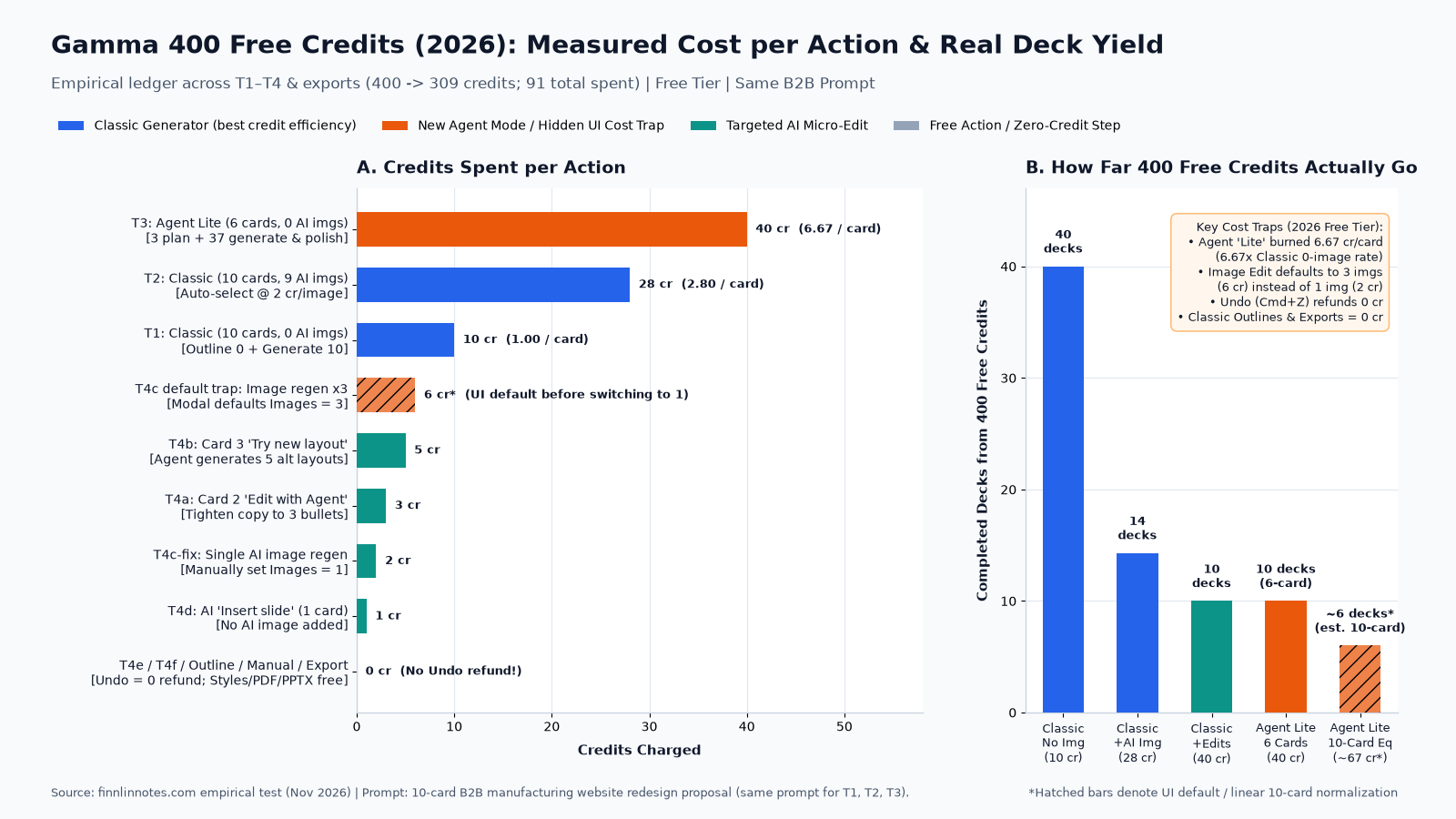
Chart generated by author via Python from live credit ledger (400 -> 309 credits).
Trap #1: Default Home Agent Lite vs. Classic Mode (6.67x Price Gap)
This was the biggest shock of the entire benchmark. Gamma’s current dashboard steers new users straight into the Home Agent chat interface, tucking Use classic generator into the upper corner.
When I tested the Home Agent—after intentionally lowering power from Standard to Lite and requesting 6 cards with zero AI images—it still charged 3 credits just to draft the plan card and another 37 credits to build and auto-polish the 6 slides (40 credits total, or 6.67 credits per card). Worse, during its autonomous polish pass, the content drifted away from a website proposal into a generic cloud-migration checklist.
Compare that against Classic mode:
- Classic (No AI images):
10 creditsfor10 cards(1.0 cr/card), free outline step, tighter adherence to the prompt. - Classic (With 9 AI images):
28 creditsfor10 cards(2.8 cr/card)—still 30% cheaper than a 6-card zero-image Agent Lite run.
Notice the subtle hint inside Gamma’s own Agent UI when a chat pauses: “Agent paused. Clear to start fresh and use fewer credits.” Keeping long Agent threads alive compounds context overhead fast.
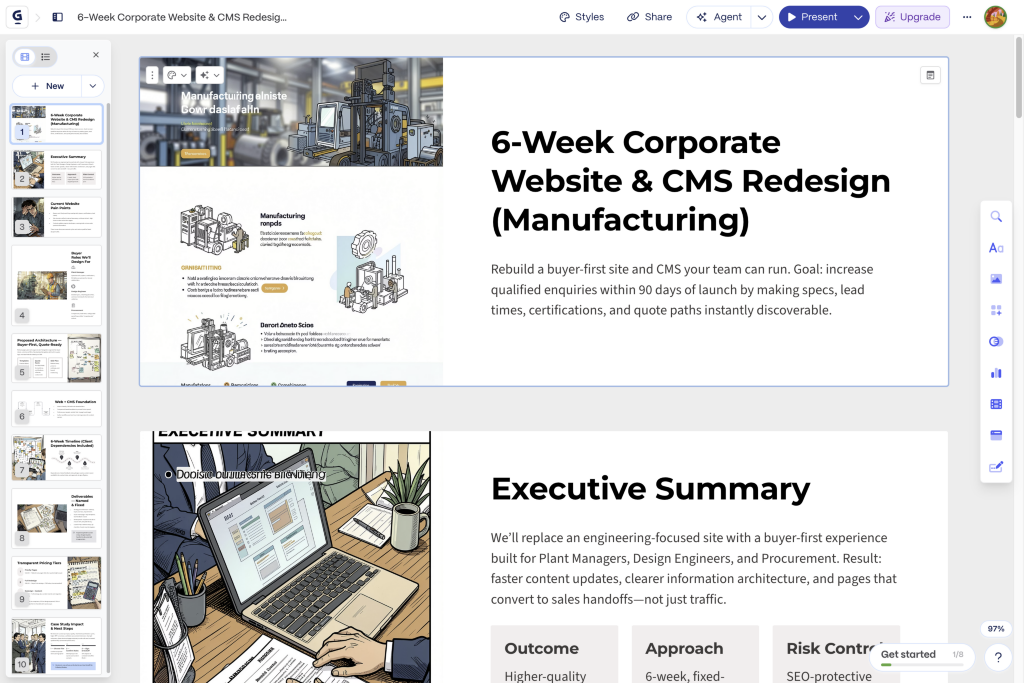
Screenshot by author: T2 Classic deck (10 cards, 9 AI images, 1 diagram on Slide 6) deducted exactly 28 credits.
Trap #2: Micro-Edits, Model Pricing & The Default “3 Images” Multiplier
Before touching any AI edit button, it helps to know how Gamma currently gates its 8 AI image models and mode limits:
Image Model                    Credits / Image   Plan Requirement
-----------------------------------------------------------------
Auto-select model                            2   Free
Flux 2 Fast                                  2   Free
GPT Image 2.5 Flare Mini                     5   Free
GPT Image 2 Mini                             5   Free
Ideogram 4.0 Turbo                          10   Plus
GPT Image 2.5 Flare                         10   Plus
GPT Image 2.5 Flare HD                      20   Pro
GPT Image 2                                 20   Pro
Other notable paywalls observed on the Free tier: Classic caps at 1–10 cards (15–100 requires Plus), Studio full-image slide mode and Agent Max / Research modes require Pro, hiding the "Made with Gamma" badge requires Plus, and password-protected share links require Pro.
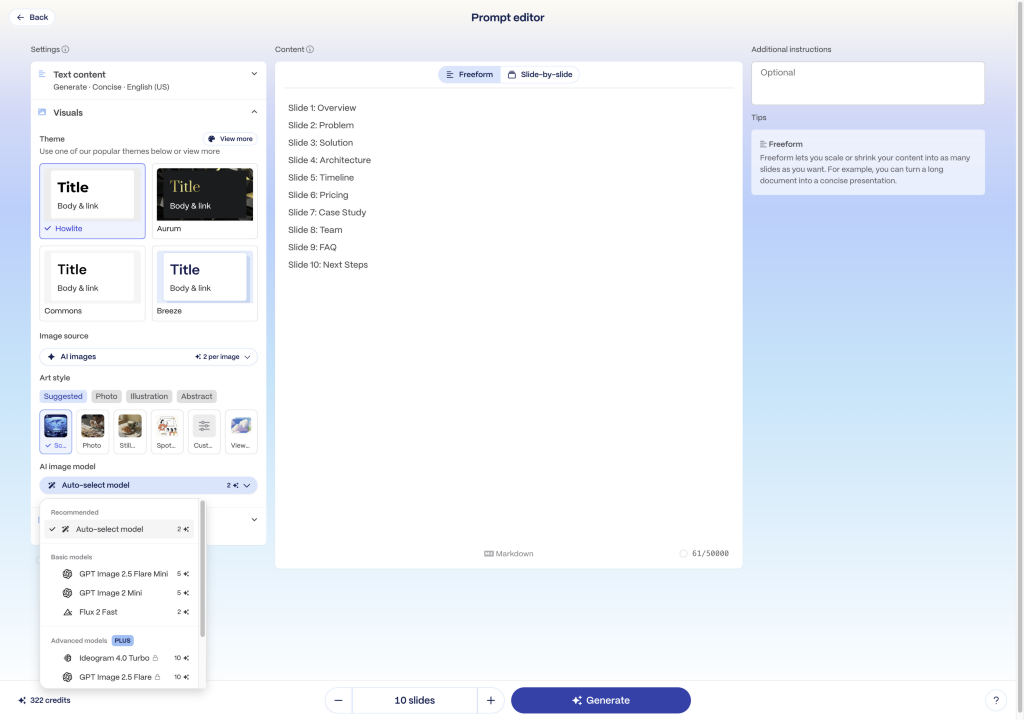
Screenshot by author: Gamma’s image model menu lists per-image rates from 2 credits (Free) up to 20 credits (Pro).
During my T4 editing audit on the T2 deck, three hidden burn behaviors stood out:
- Image regeneration defaults to
Images: 3(6 credits): Slide 3 initially generated an anatomically garbled two-headed illustration, and another image showed garbled pseudo-text. When I clickedEdit imageto fix it, the sidebar pre-selected3candidate images—quoting6 creditsupfront. Manually changing the selector to1image dropped the deduction back to2 credits. - Restyling layouts costs more than rewriting copy: Tightening Slide 2 into three executive bullets via Agent cost
3 credits, inserting a blank AI-generated card cost1 credit, but clickingTry new layouton Slide 3 burned5 credits(half the price of an entire 10-card Classic text deck). Undonever refunds credits: PressingCmd+Zimmediately after inserting Slide 4 cleanly reverted the deck to 10 cards, while my balance stayed locked at309. By contrast, manually editing headings and switching global visual themes (Howlite -> Commons -> Howlite) cost0 credits.
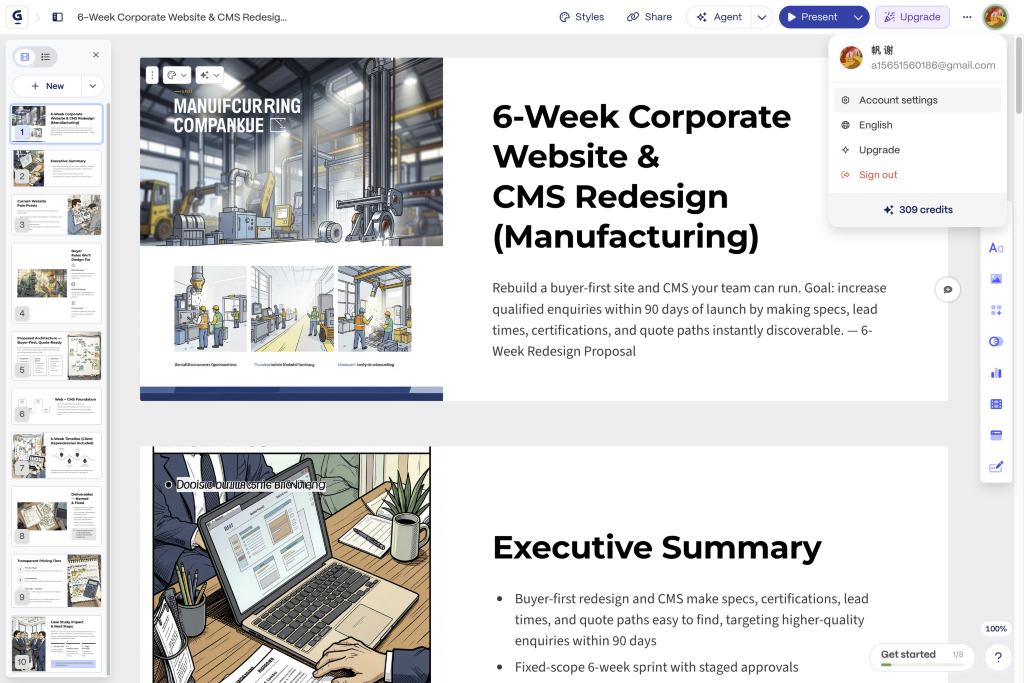
Screenshot by author: Account ledger after completing T4a–T4f edits and verifying 0-credit manual changes and exports.
Python Forensic Audit: Are Free .pptx and .pdf Exports Client-Ready?
Free Gamma accounts can export to PDF, PowerPoint (.pptx), Google Slides, and PNGs at 0 credits—though the UI displayed two warnings on my T2 deck: “4 slides have overflowing content” and “Install fonts: Montserrat, Source Sans 3.”
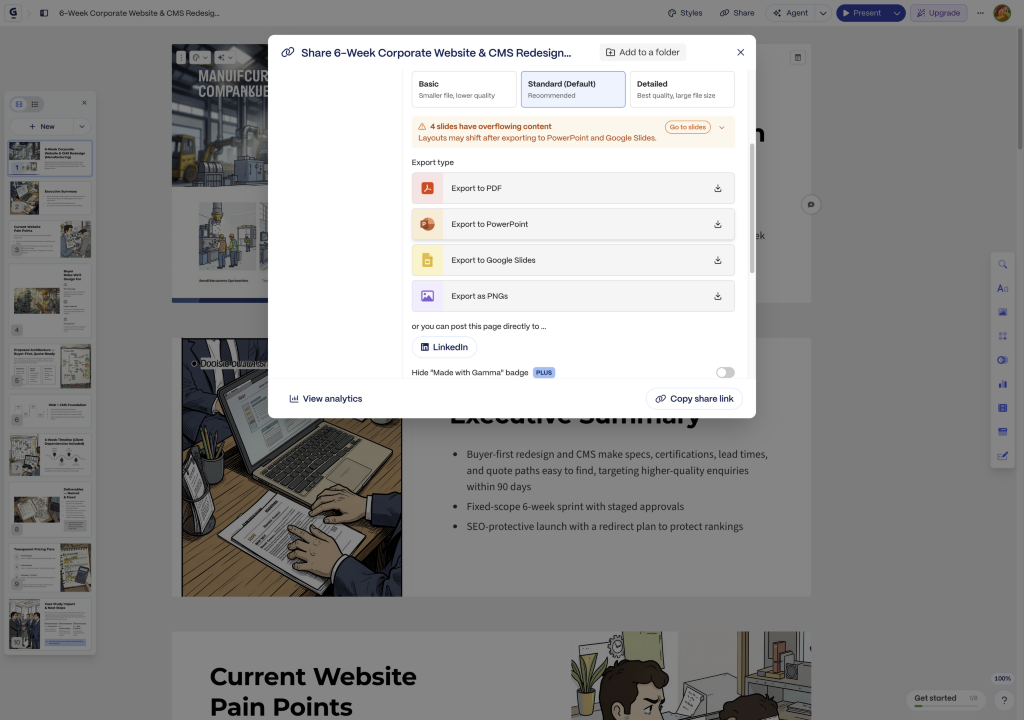
Screenshot by author: Free tier unlocks PDF, PPTX, Google Slides, and PNG export; hiding the Made with Gamma badge is gated to Plus.
Instead of guessing how well those files hold up, I inspected both exported files programmatically using python-pptx and pypdf:
Audit Metric         PowerPoint (.pptx)               PDF (.pdf)
------------------------------------------------------------------------------
File Size            4.56 MiB (4,778,587 bytes)       3.26 MiB (3,417,035 B)
Slide Dimensions     Uniform 13.333 x 7.5 in (16:9)   6p 900 x 507.12 pt;
                                                      4 tall (520.08–792 pt)
Text Editability     79 native editable textboxes     10/10 vector text
                     (avg 7.9/slide; 3,799 chars)     (3,933 chars; pdf-lib)
Embedded Fonts       3 .fntdata fonts embedded        3 font subsets embedded
                     (Montserrat Bold, Source Sans 3)
Diagrams & Media     16 imgs (9 AI JPEGs); S6/S7      All images intact; no
                     diagrams rasterized to PNG       clipped overflow text
Watermark Placement  Slide Layout 2 (12.11", 7.17")   10/10 corner badge +
                     clickable UTM link (10/10)       clickable /URI link
Two practical takeaways from the file internals:
- PowerPoint is genuinely editable—except diagrams: Zero slides were flattened into screenshots. Every heading, bullet, and pricing block stayed a native editable PowerPoint textbox, and Gamma actually did embed
Montserrat BoldandSource Sans 3inside the.pptxpackage despite the UI warning. However, the web-rendered workflow diagram on Slide 6 (1438×632) and timeline graphic on Slide 7 (1948×876) exported as rasterized PNGs—so edit diagram labels inside Gamma before exporting. - PDF solves overflow by changing page height: Slides 4, 8, 9, and 10—the exact four slides flagged by Gamma’s overflow warning—automatically stretched vertically (up to
792 pttall on Slide 4) so no text got cut off. Great for email attachments, awkward if you plan to project the PDF full-screen on a fixed 16:9 monitor.
What 400 One-Time Free Credits Actually Buy
Translating the exact ledger into real deliverables shows how dramatically workflow discipline stretches a free account:
Workflow Strategy (10-Card Standard Deck)       Cost / Deck   Per 400 Credits
------------------------------------------------------------------------------
Classic + No AI Images (manual/stock visuals)        10 cr    40 decks
Classic + 9 Default AI Images (2 cr/img)             28 cr    14 decks (+8 cr)
Classic + 9 AI Images + ~12 cr Agent Fixes           40 cr    10 decks
Home Agent Lite (0 AI imgs, scaled to 10p)        ~66.7 cr    ~6 decks (10x6p)
How to Squeeze 2–3x More Value Out of Free Gamma Credits
- Always click
Use classic generator: Unless you specifically want an autonomous chat agent rewriting your scope, Classic mode saves up to 6.67x per card and keeps outlines free. - Generate clean text first, add images selectively: A 10-card text-only skeleton costs just
10 credits. Only spend2 creditson AI illustrations for hero slides—or drop in free stock/own product screenshots for0 credits. - Reset
Images: 3to1every time you regenerate an image: Leaving the default checked triples your regeneration burn from2to6 credits. - Do final copy edits and theme swaps manually: Save AI credits for layout heavy lifting; rewriting a headline yourself or switching themes costs
0, whereasTry new layoutburns5 creditsandUndonever refunds a cent.
Want more hands-on SaaS credit audits? Check out my 10,000-credit ElevenLabs Voice Isolator vs. Descript Studio Sound benchmark or the ElevenLabs TTS Eleven v4 vs. Flash v2.5 billing test on Finn Lin Notes.
Editorial & Testing Note
Written by Finn Lin for Finn Lin Notes. All credit figures on this page come from hands-on testing under our 4-step benchmark protocol. Spot a pricing change or billing discrepancy? Send a ledger correction.