OpusClip Free Credits Ledger (2026): Credit Rounding, The Under-1-Minute Trap & FFmpeg Watermark Audit
Every credit logged from 90 to 85 on a public-domain 1080p NASA interview—verifying range-trim rounding, Pro annual pricing inversion, hidden editor fees, and pixel-level watermark geometry.
Short-form clipping tools advertise simple math: “1 credit equals 1 minute of video.” In practice, the real cost depends on how partial minutes round, whether trimming the input range before processing actually lowers your bill, what happens when a clip is too short to split, and what hidden fees sit inside the editor.
To test OpusClip’s current 2026 billing and export quality without guesswork, I pulled a public-domain 1080p NASA astronaut interview (SpaceX Crew-7 Jasmin Moghbeli Interview Resource Reel), ran two controlled uploads from 90 down to 85 credits, audited every editor paywall read-only, and inspected the exported MP4s and Premiere/DaVinci XML bundle in FFmpeg and Python.
Four findings stood out right away:
- Trimming + floor rounding works as advertised: Uploading a 6m30s video quoted 6 credits, but dragging
Adjust rangedown to00:00–04:45dropped the quote and actual charge to 4 credits—confirming partial minutes past 1 minute round down. - The under-1-minute no-refund trap: Uploading a 50-second clip triggered an orange warning (“Clipping turned off. Videos under 1 min can’t be clipped”), disabled AI clipping, and output a single unclipped 16:9 file with no Virality Score—yet still deducted 1 credit (
NonClippingProject) with zero refund. - A live 2026 pricing inversion: On OpusClip’s current pricing page, monthly-only Starter costs $12/mo for 150 credits (
8.0¢/credit), while Pro Annual drops to $11.50/mo ($138/year) for 300 credits/month (3.83¢/credit)—cheaper per month with double the credits and full feature unlocks. - Pixel-level watermark behavior & clean audio: Exports are genuine
1080×1920(3.98–4.39 Mbps, zero audio clipping at-23.8to-24.4 LUFS), but both Free Forever and the 7-day Pro Trial force a white[P] OpusClipbadge from 8.0 seconds onward spanning 32.87% of frame width right at speaker eye/temple level.
Account Baseline & Reproducible 1080p Input
My logged-in account sat on OpusClip’s Free trial (Pro plan) with 90 trial credits expiring in 7 days (compared to Free Forever, which renews at 60 credits/month, locks editing completely, restricts output to 9:16, and expires exports after 3 days). Even inside the 7-day Pro trial, watermarks stay forced and AI video upscaler stays hard-locked behind a paid upgrade.
Both test files were cut cleanly from NASA Johnson Space Center’s public-domain 1080p interview reel (jsc2023m000156, real talking-head English speech, 30 fps H.264, 48 kHz AAC):
source-6m30s.mp4: Exact390.00s(06:30),1920×108030 fps,43.36 MiB(800.9 kbps2-pass H.264 to stay under browser upload caps),-24.1 LUFS,-8.5 dBFSTrue Peak.source-0m50s.mp4: Exact50.00s(00:50),1920×108030 fps,22.19 MiB(3,519.9 kbps),-24.3 LUFS,-9.1 dBFSTrue Peak.
Full Credit Ledger: 90 to 85 Credits Reconciled
Every balance change was verified directly inside OpusClip’s Credit usage history:
Step  Action / Input Range       Before After Cost  Timing & Result
----------------------------------------------------------------------------
Init  Verify account & pricing       90    90    0  90 Trial cr (Pro trial)
T1a   Upload 6:30 -> trim 04:45      90    90    0  54.45s upload; quote 6->4
T1b   Run ClipProject (04:45)        90    86    4  166.84s render; 6 clips
                                                    (Scores: 90/84/78/71/70/60)
T1c   Download 3 MP4s + SRT + XML    86    86    0  76.4 MB XML zip; 0 cr
T2    Upload & run 00:50 clip        86    85    1  ~26s up + ~72s render;
                                                    NonClippingProject, 0 refund
Audit Read-only editor/paywall       85    85    0  Logged B-roll/X/Upscale
----------------------------------------------------------------------------
Total Reconciled Spend               90 -> 85    5  85 credits remaining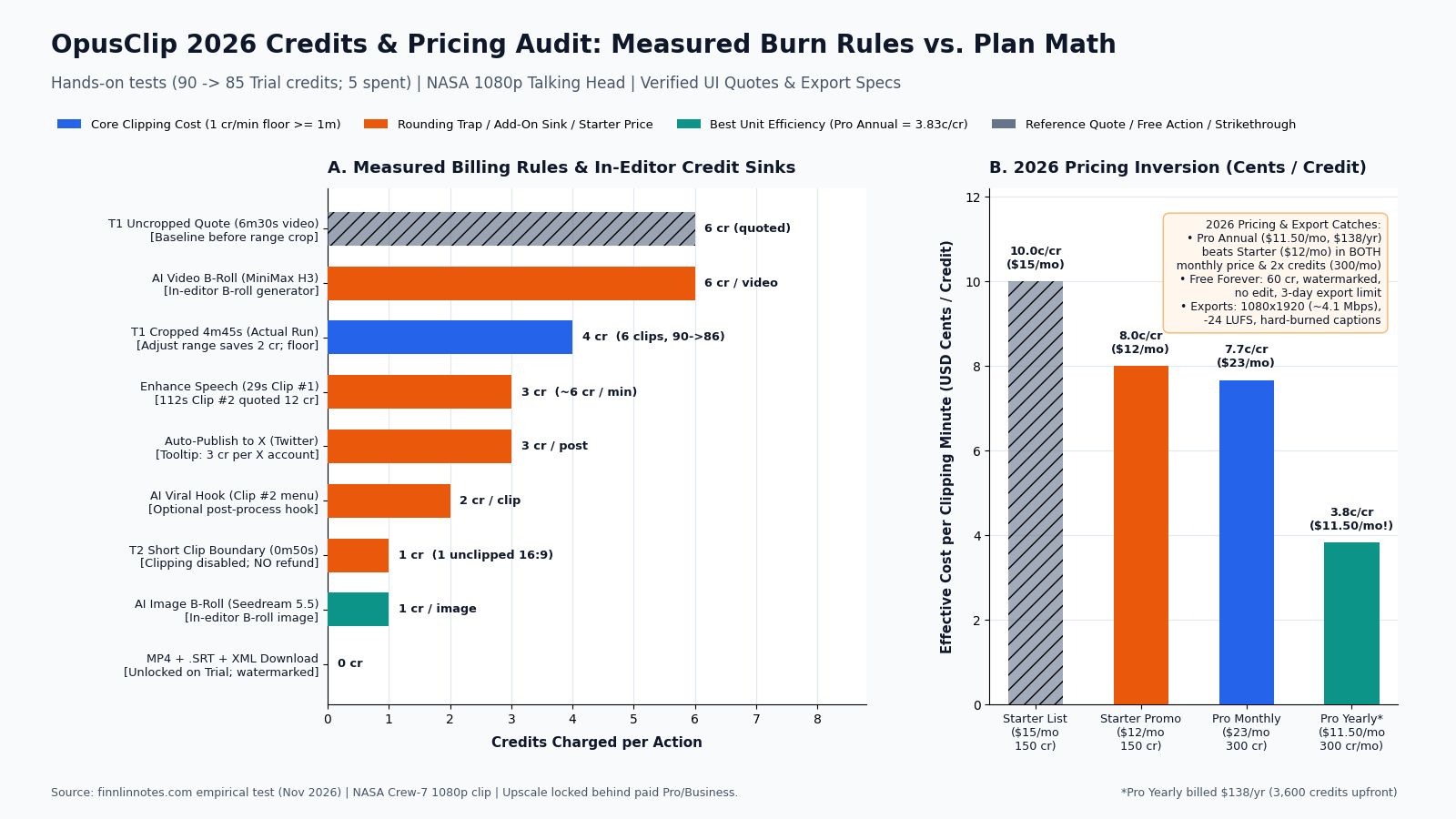
Chart generated by author via Python from live OpusClip credit history (90 -> 85) and 2026 pricing tiers.
Two billing behaviors matter if you batch-process interviews or podcasts:
- Always use
Adjust rangebefore clickingGet clips: Trimming dead intro/outro minutes directly inside OpusClip’s upload screen immediately reduced the quoted deduction from6to4credits—saving 33% without opening an external editor first. - Never feed sub-60-second clips into the clipping queue: OpusClip warns that videos under 1 minute cannot be clipped, switches the job to
NonClippingProject, skips Virality Scoring and reframing, and still burns1 creditwith no automatic refund.
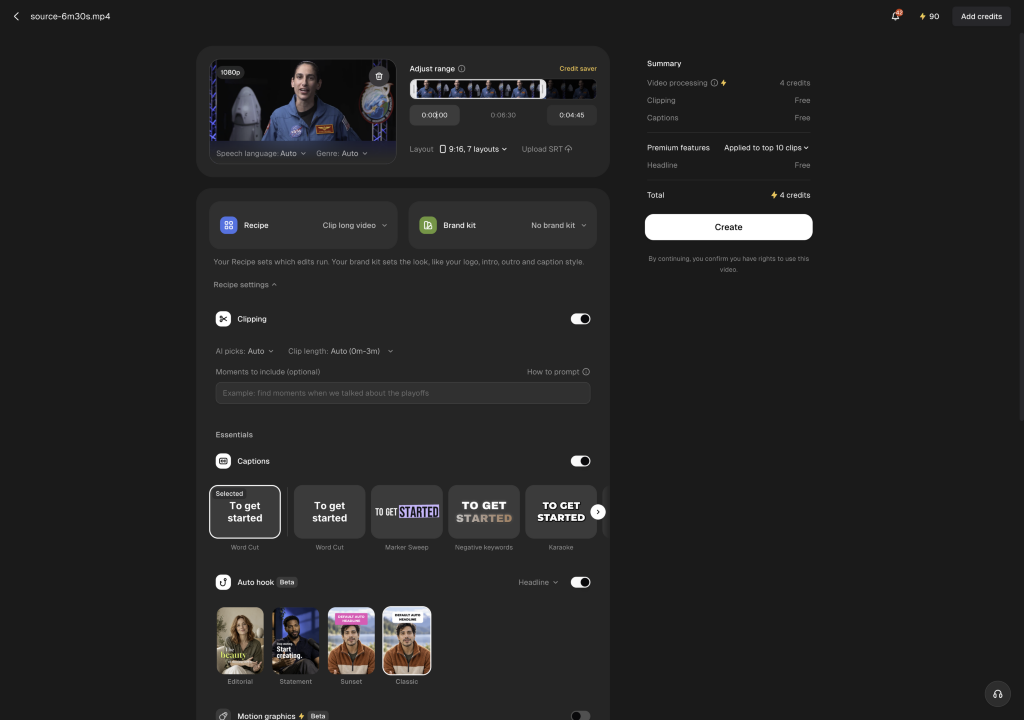
Screenshot by author: Dragging the processing timeframe to 04:45 lowered the upfront credit quote from 6 to 4 credits.
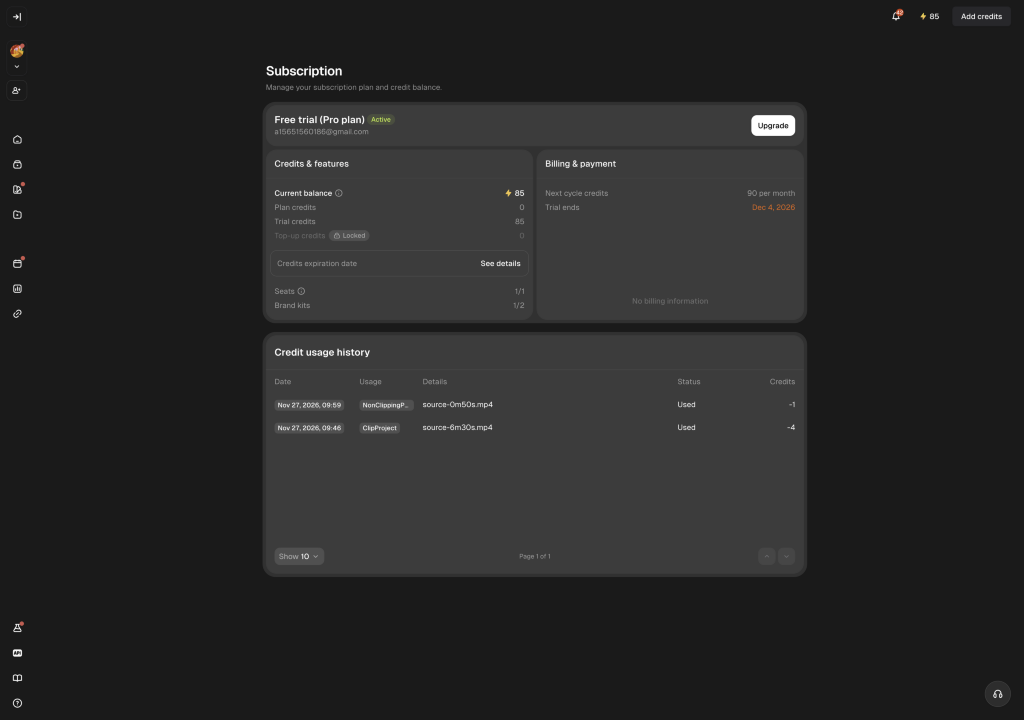
Screenshot by author: Final reconciled ledger showing -4 credits for the 4m45s clip project and -1 credit for the unclipped 50-second run.
The 2026 Pricing Inversion & Hidden Editor Credit Fees
Checking live upgrade modals revealed a pricing quirk that catches monthly buyers off guard:
Plan Tier           Effective Price    Monthly Pool   Unit Cost   Key Limits
----------------------------------------------------------------------------
Free Forever        $0/mo               60 cr/mo      $0.000/cr   Watermark,
                                                                  no editing,
                                                                  3-day expiry
Starter (Monthly)   $12.00/mo (was $15) 150 cr/mo     8.00c/cr    No XML/SRT,
                                                                  no Upscale,
                                                                  30-day expiry
Pro (Monthly)       $23.00/mo           300 cr/mo     7.67c/cr    Full unlocks
Pro (Annual)        $11.50/mo ($138/yr) 300 cr/mo     3.83c/cr    3,600 cr/yr
                                                                  upfront
If you plan to stick with OpusClip for a full year, Starter is mathematically obsolete: paying $138/year for Pro Annual costs less per month than $12/month Starter while doubling your monthly credits and unlocking .SRT captions, Premiere/DaVinci XML exports, multi-aspect ratios, and AI video upscaler.
Inside the clip editor, several add-on actions also draw from the same credit pool—notably Publish to X, which now explicitly charges 3 credits per post:
Editor / Publishing Action                Quoted Credit Cost / Gate
----------------------------------------------------------------------------
AI video B-roll (MiniMax H3)              6 credits / video
Enhance speech (audio cleanup)            ~6 credits / min (3 cr for 29s;
                                          12 cr for 112s)
Publish directly to X                     3 credits / post
AI viral hook                             2 credits
AI image B-roll (Seedream 5.5 / GPT 2.5)  1 credit / image
Remove watermark                          Locked to Starter ($12/mo)+
AI video upscaler                         Locked even in 7-day Pro Trial
                                          (requires paid Pro / Business)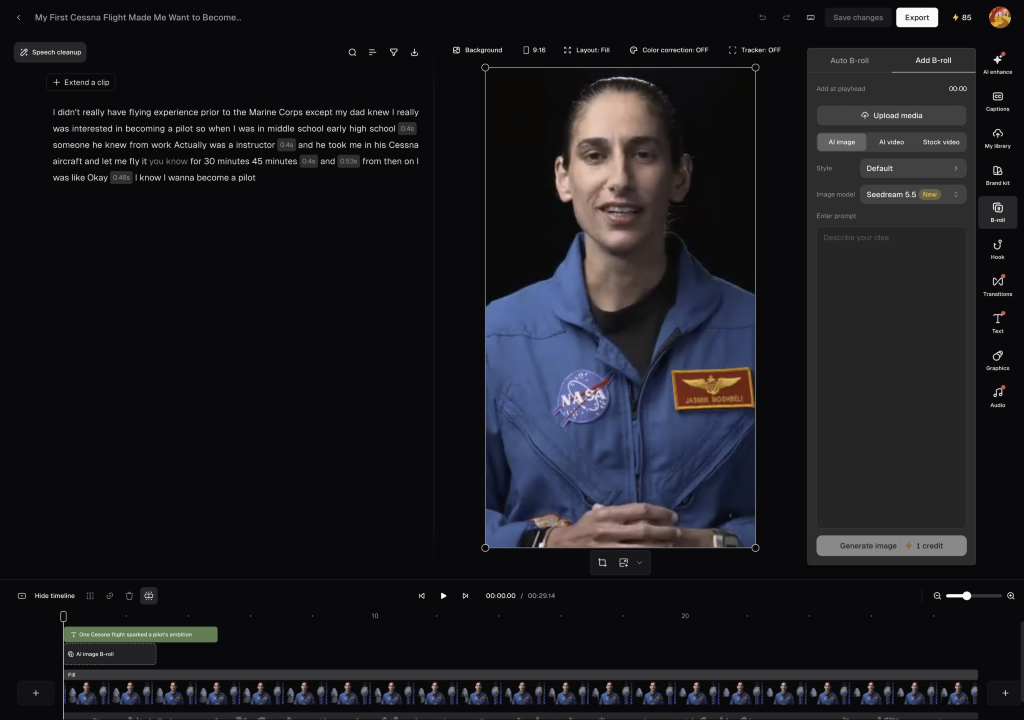
Screenshot by author: Read-only audit of hidden credit costs inside the OpusClip editor (AI B-roll and audio enhancement).
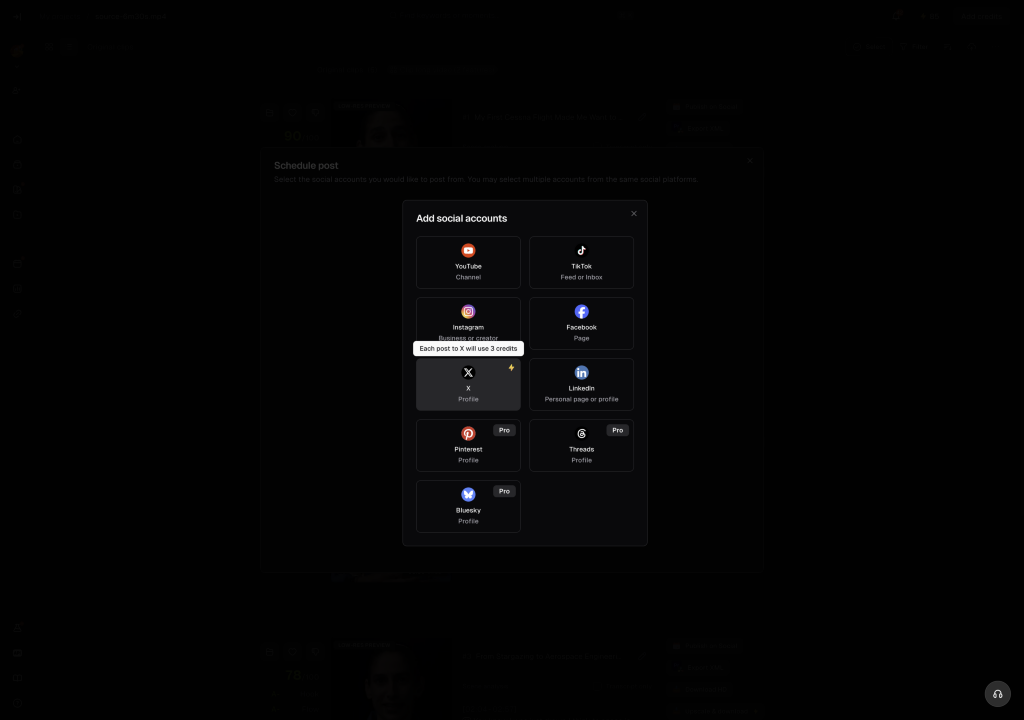
Screenshot by author: Tooltip confirming each direct X post consumes 3 credits.
FFmpeg & Python Forensic Audit: Bitrate, Loudness & Watermark Geometry
To verify whether free/trial exports quietly downgrade video quality or clip audio like some AI enhancers, I ran ffprobe, FFmpeg’s ebur128 loudness scanner, and a Python pixel-diff frame inspector across all three exported vertical clips (opus-clip-01/02/03.mp4):
Stream Metric         Source Input (16:9)   OpusClip Exports (Clips 1–3)
----------------------------------------------------------------------------
Resolution & FPS      1920x1080 @ 30 fps    1080x1920 (9:16) @ 30 fps
Video Codec / Rate    H.264 / 800.9 kbps    H.264 yuv420p / 3,982–4,392 kbps
Audio Codec / Rate    AAC 48k / 122.9 kbps  AAC 48k stereo / 263.6–268.3 kbps
Integrated Loudness   -24.1 LUFS            -23.8 to -24.4 LUFS
True Peak (Clipping)  -8.5 dBFS (0 clips)   -8.6 to -9.1 dBFS (0 clips)
Subtitle Streams      0 tracks              0 tracks (hard-burned pixels)
Two technical surprises stood out in the container and frame inspection:
- Clean encode + surprisingly complete XML bundle: OpusClip did not fake 1080p or crush bitrate—exports averaged
4.0–4.4 Mbpswith clean stereo audio tracking the source loudness within±0.3 LUFSand zero clipping. WhileWord Cutcaptions are hard-burned into the MP4 pixels (0subtitle tracks), clickingExport XMLduring the Pro trial downloaded a76.4 MB.zip(60 files) containing Premiereresult.xml, DaVinciresultForDavinci.xml,caption.srt, clean separated0_0.mp4+1_0.m4atracks, and transparent caption assets. - Exact watermark animation timeline (identical across all 3 clips):
0.0s – 4.2s: Zero watermark pixels—the openingAuto hookwhite title card occupies[x: 183..896, y: 750..1000].4.3s – 7.5s: A vertical intro banner ("Created with [logo]") slides in on the upper left ([x: 123..206, y: 272..699]).8.0s – End: Locks permanently into a white[P] OpusClipbadge at[x: 123..477, y: 254..338]—355×85 px, covering 32.87% of total frame width (1.46%bounding-box area) at13.2%vertical height, sitting directly next to a talking-head speaker’s upper-left eyebrow/temple. Meanwhile, hard-burned captions stay insidey = 1350..1593(70.3%–83.0%vertical height), safely clear of Shorts and Reels bottom UI overlays.
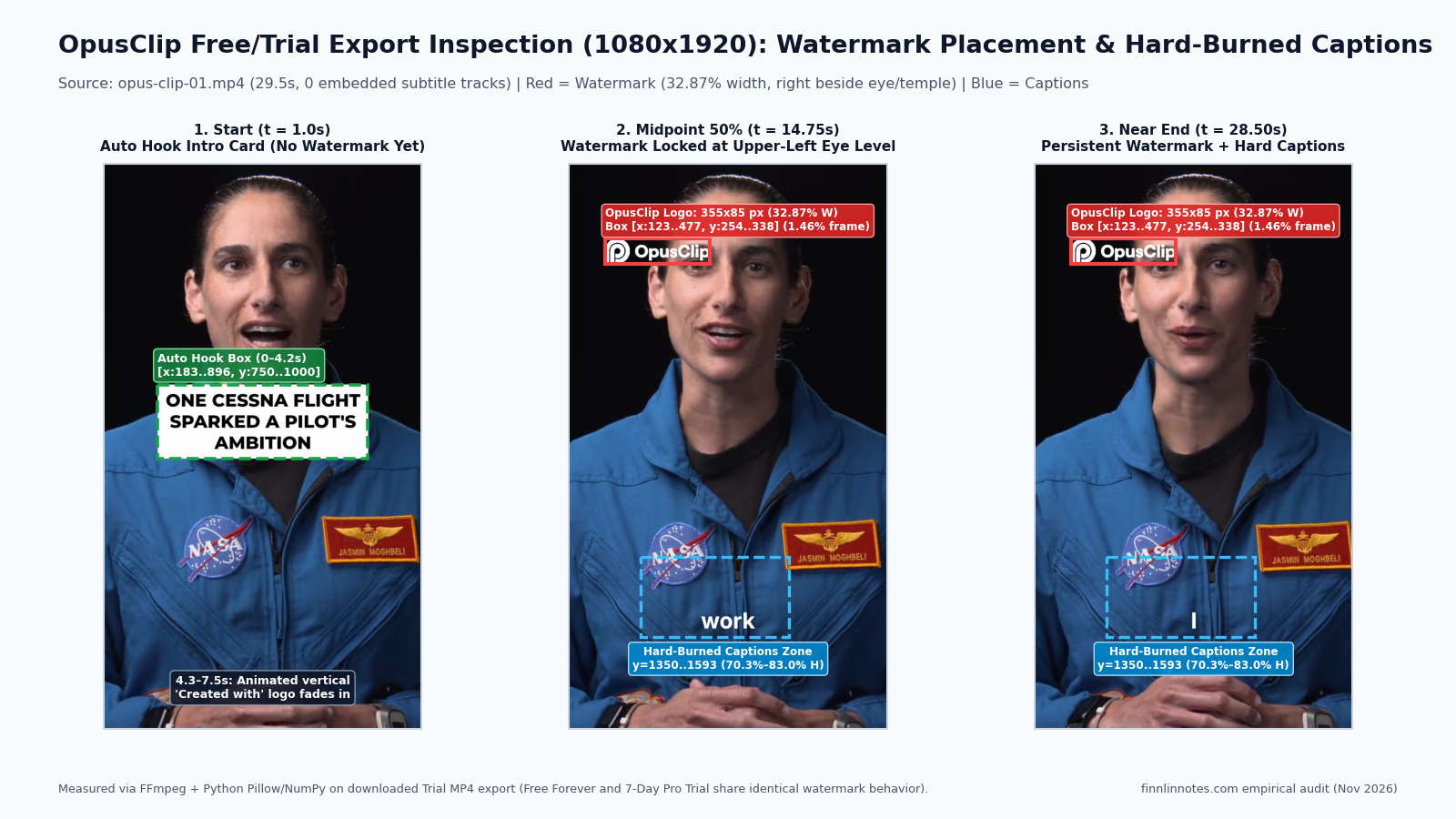
Chart generated by author via Python: Frame inspection at start, mid-clip, and end marking the exact 355×85 px watermark box and bottom caption safe zone.
Verdict: How to Use OpusClip Without Wasting Credits
- If you’re testing on Free Forever or the 7-day Pro Trial: Treat free exports as layout and Virality Score previews rather than final client deliverables—the
32.87%-width watermark next to the speaker’s face is impossible to crop cleanly in 9:16, and Free Forever expires downloads after 3 days. Always trim intros/outros withAdjust rangefirst, and never feed videos under 60 seconds. - If you’re upgrading for regular Shorts/Reels production: Skip monthly Starter (
$12/mofor 150 credits without XML/SRT) unless you strictly need a single month. At$11.50/mobilled annually ($138/yr), Pro Annual cuts your per-credit cost by more than half (3.83¢vs.8.0¢) and unlocks the clean Premiere/DaVinci XML bundle. Skip the3-creditX direct-publish button and post natively for free.
More reproducible SaaS credit ledgers on Finn Lin Notes: compare this with my Gamma 400 Free AI Credits Audit and my ElevenLabs Voice Isolator vs. Descript Studio Sound benchmark.
Editorial & Testing Note
Written by Finn Lin for Finn Lin Notes. All credit figures on this page come from hands-on testing under our 4-step benchmark protocol. Spot a pricing change or billing discrepancy? Send a ledger correction.