Submagic vs. OpusClip (2026): I Burned 14 Free Credits on Both—Here’s Where Each “Free” Tier Breaks
A side-by-side 2026 audit on identical 1080p NASA astronaut interviews: Submagic’s zero-MP4 Trial paywall, instant 2.0x AI feature taxes, 20-credit Iris threshold, and OpusClip’s 32.87% eye-level watermark.
Most 2026 comparison posts treat AI short-form editors as interchangeable “15 free credits vs. 60 free minutes” checkboxes. In real creator workflows, those headline numbers hide opposite breaking points—and neither free tier actually gives you a clean, durable MP4 deliverable.
To put both platforms on an exact level playing field, I ran the same public-domain 1080p NASA astronaut interview cuts (0:50 and 6:30) used in my OpusClip 2026 credit ledger through a fresh, non-affiliate Submagic Trial account (15 -> 1 credits, 14 spent), logged every balance jump inside Usage -> History, and ran ffprobe and Pillow pixel geometry checks across all outputs.
TL;DR — Where Each “Free” Tier Breaks in 30 Seconds:
- Submagic Trial (
15 credits, no card required): You get free.SRTsubtitle downloads (0credits), unlimited0-credit manual typo edits and template switching (20free styles), and zero 3-day project expiration. However, every single MP4 video export (1080p,720p, and evenSubtitles only) is locked behind a hard$12/mo+checkout modal. Meanwhile,AI Auto Zooms(+1) andRemove Silence(+2) deduct credits on click with zero confirmation popup, andIriscosts20–40 credits—exceeding the entire15-credit Trial pool. - OpusClip Free / 7-Day Pro Trial (
60–90 credits): You can actually download native1080×1920MP4 files (3.98–4.39 Mbps, zero clipping), butFree Foreverexpires downloads after3days, stamps a permanent[P] OpusClipbadge spanning32.87%of frame width next to the speaker’s eyebrow/temple from8.0sonward, and silently burns1 creditwith zero refund when you upload a sub-60-second video.
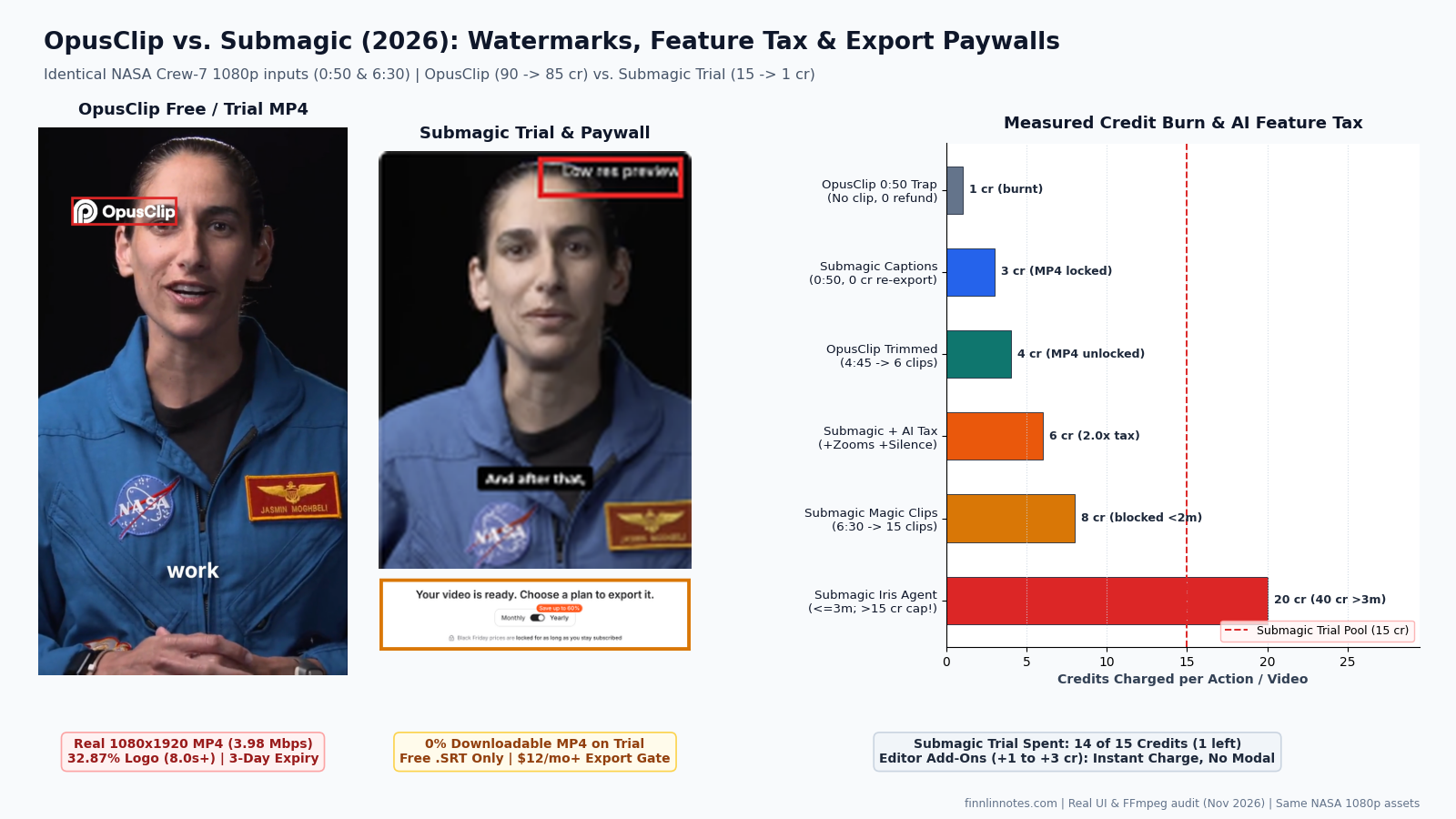
Chart generated by author via Python: OpusClip’s 32.87%-width exported watermark (left), Submagic Trial’s paywalled 9:16 preview (center), and logged credit burn across identical NASA 1080p inputs (right).
Test Setup: Identical NASA 1080p Inputs & Account Baseline
Instead of testing each tool on different demo footage, I reused the exact two uncompressed/2-pass H.264 cuts sliced from NASA Johnson Space Center’s public-domain SpaceX Crew-7 Jasmin Moghbeli Interview Resource Reel (jsc2023m000156):
source-0m50s.mp4: Exact50.00s,22.19 MiB,1920×1080@30 fps, H.2643,519.9 kbps, AAC48 kHzstereo193.2 kbps,-24.3 LUFS, True Peak-9.1 dBFS,0subtitle streams.source-6m30s.mp4: Exact390.00s(06:30),43.36 MiB,1920×1080@30 fps, H.264800.9 kbps, AAC48 kHzstereo122.9 kbps,-24.1 LUFS, True Peak-8.5 dBFS,0subtitle streams.
I registered directly on submagic.co without any affiliate referral parameter or credit card. The dashboard opened on Trial plan with 15 credits left (plus a separate 3 Credits pool inside Submagic’s Thumbmagic thumbnail tab).
The 15-to-1 Submagic Credit Ledger (14 Spent)
Step   Action / Input           Before After Cost  Measured Timing & Outcome
----------------------------------------------------------------------------
Init   /home & /user?tab=usage      15    15    0  No reset or expiry date
ExpA   Upload 0:50 -> Captions      15    12    3  28.4s up + 13.6s ASR
ExpA   1080p/720p/Sub-only Exp      12    12    0  All 3 paywalled ($12/mo+)
ExpA   .SRT + 2 edits + style       12    12    0  60 cues free; Save = 0 cr
ExpB   Activate Auto Zooms (+1)     12    11    1  <1.5s; 8 zooms; NO modal
ExpB   Activate Silence (+2)        11     9    2  4.28s; -6 pauses (48.1s)
ExpC   Magic Clips 0:50 (<2m)        9     9    0  Rejected upfront (0 cr)
ExpC   Sample + Iris modal check     9     9    0  Sample free; Iris 20-40 cr
ExpC2  Magic Clips 6:30 (flat)       9     1    8  No trim; 15 clips (locked)
----------------------------------------------------------------------------
Total  Reconciled Trial Usage   15 -> 1    14  "no more video credit" bar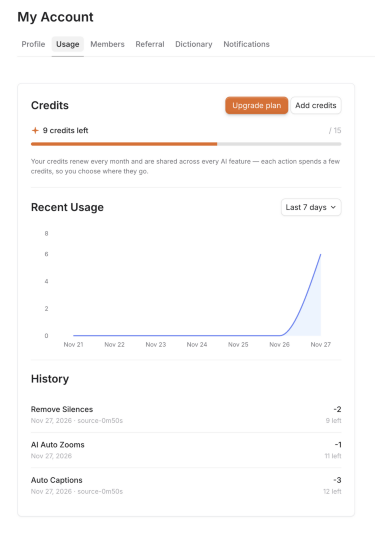
Screenshot by author: Submagic’s Usage -> History ledger reconciling Auto Captions (-3), AI Auto Zooms (-1), and Remove Silences (-2), with no monthly reset or trial expiration date shown.
Three billing mechanics inside Submagic’s Trial UX caught me off guard:
- The missing refresh date on
/user?tab=usage: The Usage panel states generically: “Your credits renew every month and are shared across every AI feature.” Unlike recurring paid seats, however, Trial displays no next monthly reset date and no expiration date. Once your balance hits1 credit(below the3-credit Captions minimum), a permanent top orange banner warns:"You have no more video credit. Upgrade to use more." - Optimistic balance flicker during upload:
New caption projectskips any pre-upload toggle screen and begins uploading immediately. At0%upload progress, the top-right counter flashed12 credits, reverted to15 creditsduring server transcription (64%), and settled permanently at12once the editor loaded (~42.0stotal). - Instant
2.0xAI feature tax with zero confirmation dialog: Every AI add-on inside the editor’sAI Toolstab carries a+1to+3credit pill. ClickingActivateonAI Auto Zooms(+1) andRemove Silence(+2) processed in1.5sand4.28swithout any confirmation modal, turning a3-credit0:50video into a6-credit job (2.0xcost) while exports stayed paywalled.
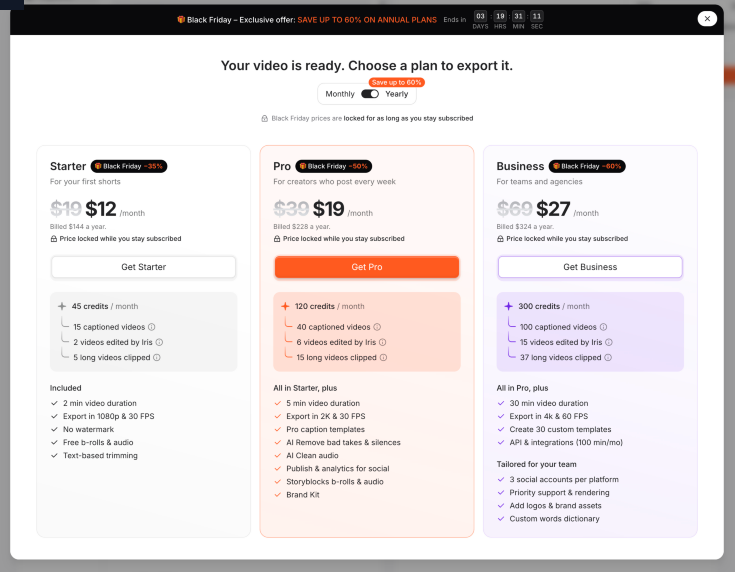
Screenshot by author: Clicking Export at 1080p, 720p, or even Subtitles only (green) opens "Your video is ready. Choose a plan to export it." on the Trial plan.
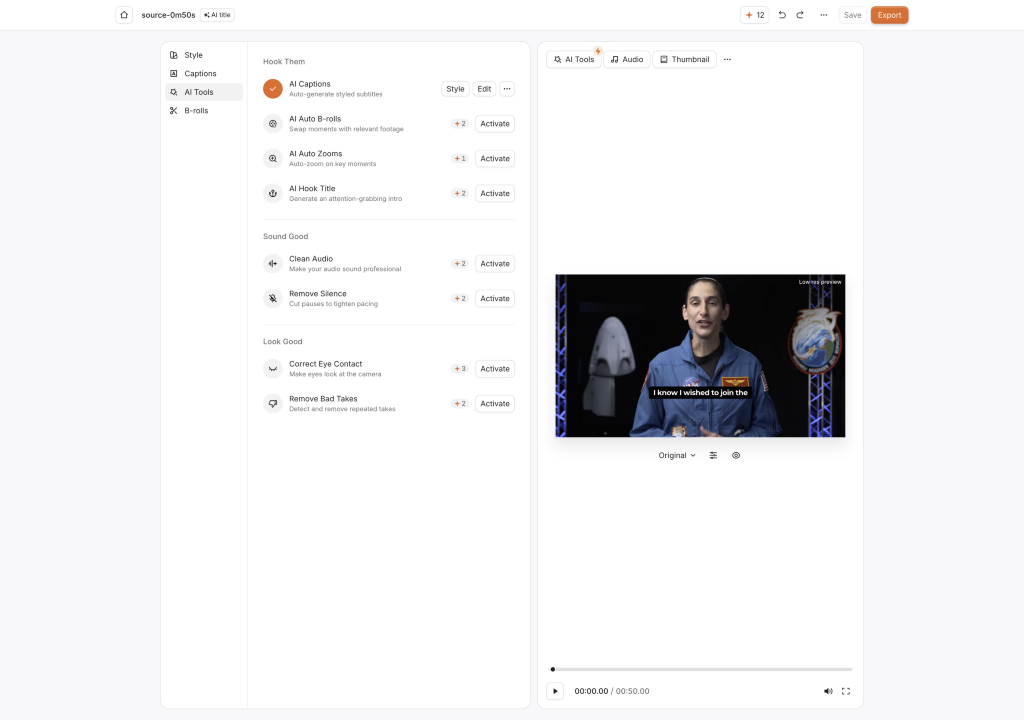
Screenshot by author: Submagic’s AI Tools sidebar shows transparent per-tool credit pills (+1 to +3), though activating them deducts immediately without a confirmation dialog.
The “Free on Your Trial” 20-Credit Trap & Pricing Comparison
Submagic’s onboarding /welcome flow and /home dashboard badge Iris · AI editing agent as New · Free on your trial. Clicking inside immediately reveals the catch: Iris charges 20 credits for videos up to 3 minutes, and 40 credits for 3–6 minutes—meaning a fresh 15-credit Trial account cannot complete even a single full Iris edit (only + Paste a video -> Create template quotes 4 credits).
There is also a subtle mismatch between Submagic’s /pricing matrix and its live editor: /pricing lists AI Remove bad takes & silences exclusively as a Pro ($19/mo Yearly / $39/mo Monthly) unlock, yet Trial accounts can trigger Remove Silence (-2 cr) inside the editor anyway—even though they still cannot export the resulting MP4 without upgrading.

Screenshot by author: Despite being badged "Free on your trial" during onboarding, Iris starts at 20 credits (<= 3 min) and jumps to 40 credits (3–6 min), exceeding the 15-credit Trial pool.
| Live 2026 Tier Comparison | Submagic Starter (Yearly / Monthly) | Submagic Pro (Yearly / Monthly) | OpusClip Starter (Monthly only) | OpusClip Pro (Yearly / Monthly) |
|---|---|---|---|---|
| Effective Price | $12/mo ($144/yr, -35%) / $19/mo |
$19/mo ($228/yr, -50%) / $39/mo |
$12/mo ($15 list) |
$11.50/mo ($138/yr) / $23/mo |
| Monthly Credits | 45 cr/mo (26.7c/cr yr) |
120 cr/mo (15.8c/cr yr) |
150 cr/mo (8.0c/cr) |
300 cr/mo (3.83c/cr yr) |
| Max Duration / Export | 2 min Captions (3 h Magic Clips) / 1080p 30fps |
5 min Captions (3 h Magic Clips) / 2K 30fps |
9:16 only / 30-day export lock |
9:16, 1:1, 16:9, 4:5 / No expiry |
Watermark & .SRT |
No watermark / Free .SRT |
No watermark / Free .SRT |
Watermark removed / No .SRT or XML |
Watermark removed / .SRT + Premiere/DaVinci XML |
(Note: Submagic’s Black Friday yearly rates carry "Price locked while you stay subscribed"; Business reaches $27/mo yearly / $69/mo monthly for 300 cr/mo and 4K 60fps.)
Head-to-Head Forensic Audit: Submagic vs. OpusClip
Metric / Behavior        OpusClip Free / Trial     Submagic Trial (Nov 2026)
----------------------------------------------------------------------------
50s (<1m) Clip Input     Silently disables clips   Client-side block (<2m)
                         & burns 1 cr (0 refund)   at 0 credits spent
6m30s Clipping Cost      6 cr -> 4 cr trimmed      Flat 8 cr (no trim bar)
                         via Adjust range (4m45s)  -> 15 clips (94%-85%)
Downloadable MP4 (Free)  Yes: 1080x1920 @ 30fps    No: 720p/1080p/Sub-only
                         (3.98-4.39 Mbps, -24LUFS) blocked behind checkout
Downloadable .SRT (Free) Pro Trial only (Free x)   Yes: 0 cr (60 cues, 49.8s)
Edits & Style Resets     Free Forever locks editor Manual edits + 20 styles
                                                   saved cleanly at 0 cr
Watermark Geometry       [P] OpusClip 355x85 px    0 px brand watermark on
                         (32.87% W) at eye level   your clips (Low res badge
                         from 8.0s+ (3-day lock)   14.2% W; Sample 36.8% W)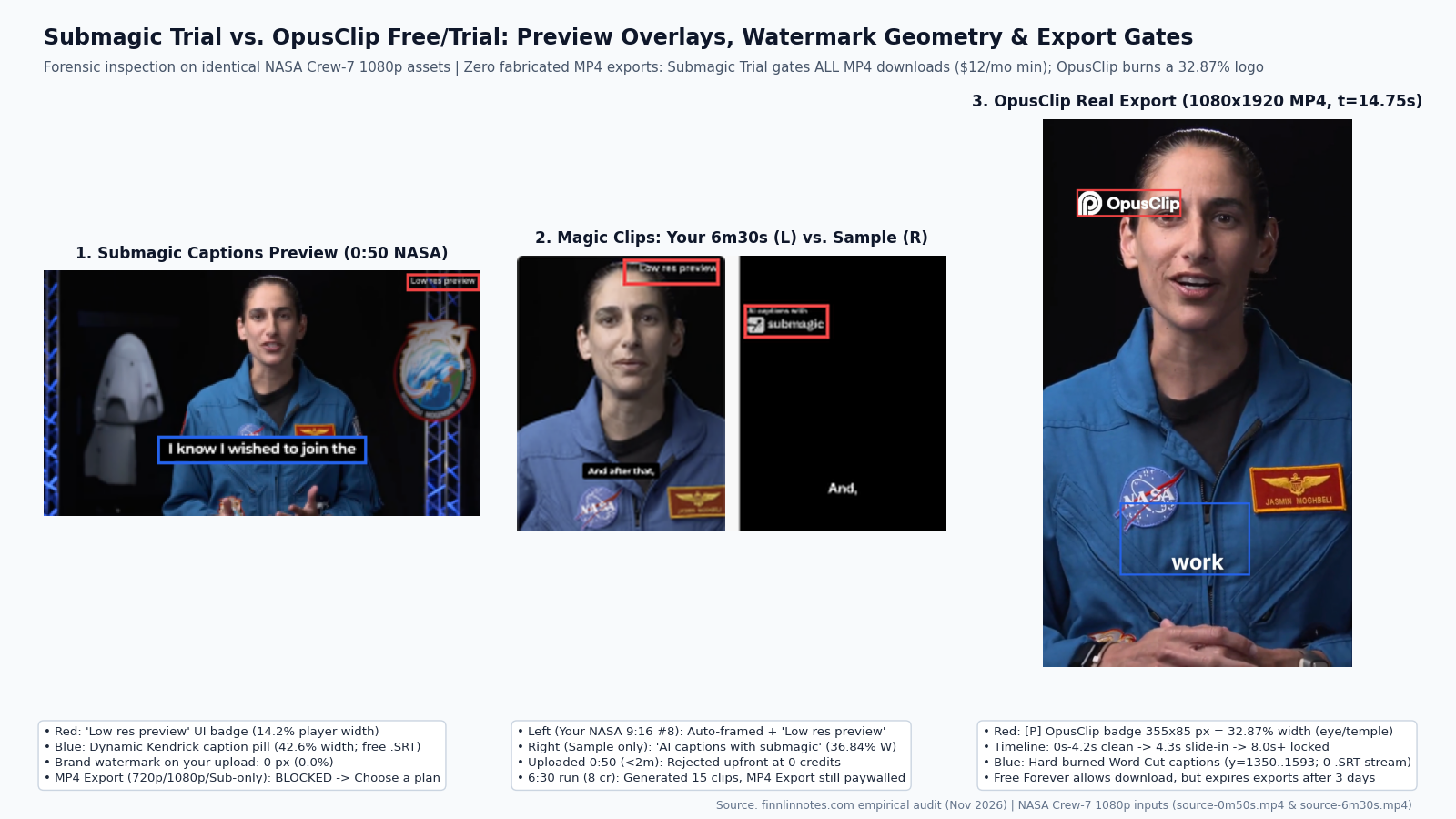
Chart generated by author via Python: Pixel-level inspection across Submagic Captions (Low res preview = 14.2% width, Kendrick pill = 42.6% width), Submagic Magic Clips (user-uploaded 9:16 vs. official Sample "AI captions with submagic" badge = 36.84% width), and OpusClip’s exported 1080×1920 [P] OpusClip watermark (355×85 px = 32.87% width).
Three practical technical takeaways stood out when running identical NASA audio through both tools:
- Submagic protects you from the 50-second credit trap: Feeding
source-0m50s.mp4into Magic Clips triggered an instant client-side block ("The minimum duration of Magic Clips is 2 minutes. Please select longer video") at0 credits. OpusClip charged1 credit(NonClippingProject) for the exact same50.0supload and produced one unclipped 16:9 file with no score. - OpusClip wins on long-form flexibility (
Adjust rangevs. flat8 cr+98%hang): Onsource-6m30s.mp4, Submagic’s Magic Clips offered no trim slider and charged a flat8 credits(9 -> 1), outputting15clips (94%–85%,00:34–00:51) while/homestayed stuck showing"Generating... ETA ~ 1m"and individual clip editors stalled at"Transcribing your video… 98%". OpusClip let me trim6:30down to4:45beforehand for4 credits(6clips) and exported real1080×1920MP4s (-23.8to-24.4 LUFS,0clipping) plus a76.4 MBPremiere/DaVinci XML zip. - Submagic’s
.SRTtiming is free and accurate—but keeps filler stutters: The0-creditsource-0m50s-submagic.srtexport (60cues across0.00–49.76s,158words,2,810bytes) tracked rapid speech tightly while keeping verbatim stutters ("the the","that that","what what","to to"), making manual cleanup inside the free editor easy before paying or exporting.SRTinto DaVinci Resolve / Premiere.
Honest Verdict: Who Should Pick Which Tool?
- If you strictly need a free, downloadable MP4 without paying today: Neither tool is spotless, but OpusClip is the only one of the two that lets free users download real
1080×1920MP4s—just accept that Free Forever expires downloads after3days and stamps a32.87%-width[P] OpusClipbadge near the speaker’s temple from8.0sonward. Submagic Trial gives you zero downloadable MP4 files, though it lets you export.SRTcaptions cleanly at0credits. - If you edit your own Shorts/Reels and are choosing a
$12/monthpaid plan for captions & pacing: Compare Submagic Starter ($12/mo billed annually) (affiliate link) or its dedicated AI captioning workflow (affiliate link). At the exact same$12/moheadline rate as OpusClip’s monthly Starter plan ($12/mo), Submagic unlocks1080pwatermark-free MP4 exports,20stylized dynamic templates (Kendrick,Hormozi,Beast), unlimited0-credit manual typo/style revisions, no 3-day export expiry, and modular+1/+2zoom and silence-removal tools—just check whether45 credits/mo(15captioned clips before add-ons) fits your monthly volume. - If your priority is batch-clipping long podcasts or webinars every week: OpusClip Pro Annual (
$11.50/mo,$138/yr) beats Submagic’s$12/moStarter and$19/moPro on unit math (300 credits/mo=3.83¢/credit,Adjust rangepre-trimming, and76.4 MBPremiere/DaVinci XML bundles).
More reproducible SaaS credit ledgers on Finn Lin Notes: read the full OpusClip 2026 Credit Ledger & FFmpeg Watermark Audit and my Gamma 400 Free AI Credits Audit.
Editorial & Testing Note
Written by Finn Lin for Finn Lin Notes. All credit figures on this page come from hands-on testing under our 4-step benchmark protocol. Spot a pricing change or billing discrepancy? Send a ledger correction.